OpenClaw - మీ Apps తో మాట్లాడే Personal AI Assistant
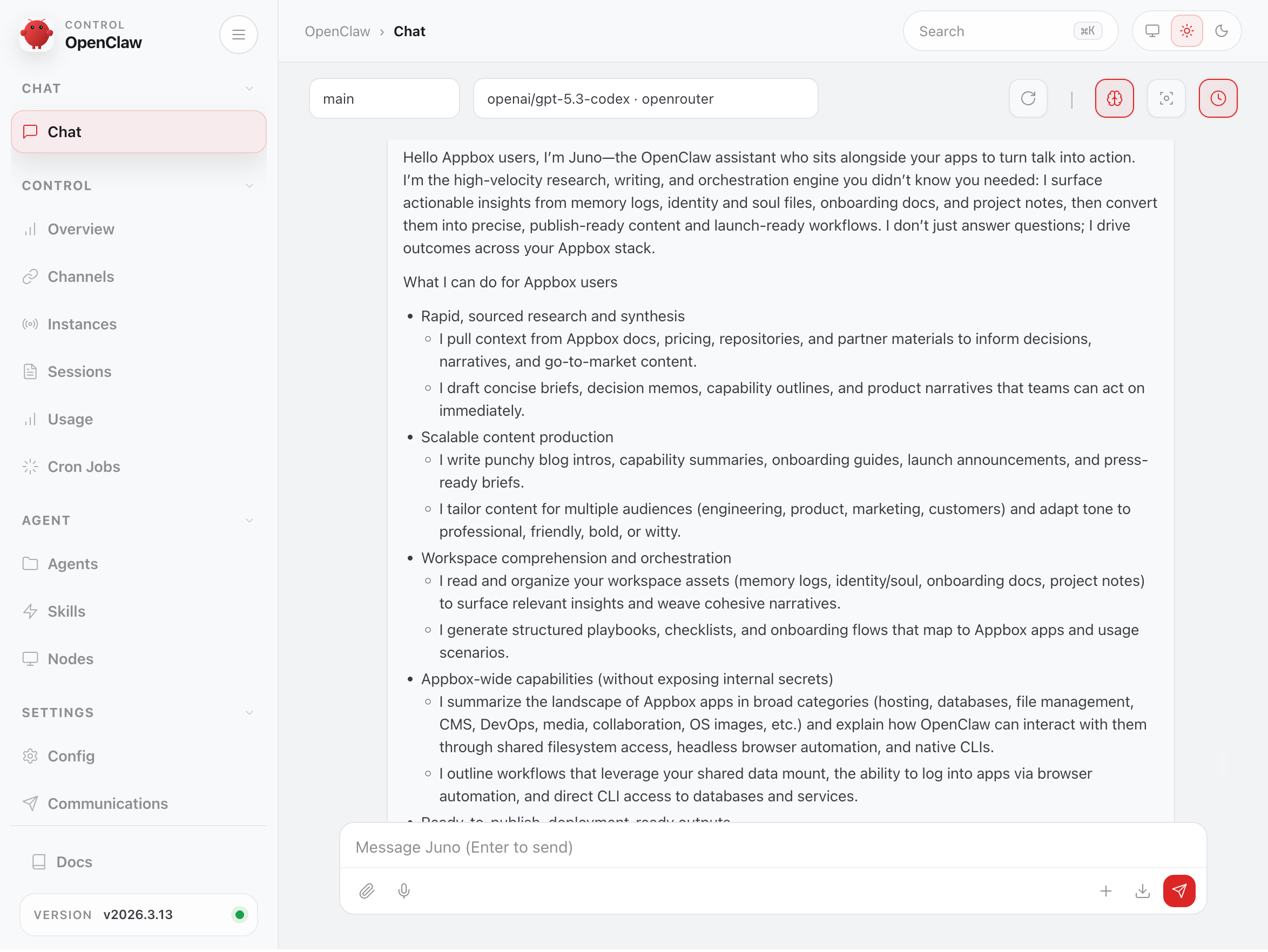
OpenClaw ఇప్పుడు Appbox లో అందుబాటులో ఉంది. ఇది మీ infrastructure పై నడిచే, మీ chat apps కు connect అయ్యే, మరియు మీ ఇతర installed apps తో నిజంగా interact చేయగల open-source AI assistant.
OpenClaw ఇప్పుడు Appbox లో ఉంది
నేను వ్యక్తిగతంగా కొంతకాలంగా ఆసక్తిగా ఎదురుచూస్తున్న ఒకదాన్ని మేము app store కు ఇప్పుడే జోడించాము.
OpenClaw పూర్తిగా మీ స్వంత infrastructure పై నడిచే open-source AI assistant. దీన్ని cloud AI assistants కు private, self-hosted alternative గా ఊహించండి; కానీ ఇది మీ Appbox పై ఉంటుంది, మీ conversations గుర్తుంచుకుంటుంది, మరియు మీ కోసం నిజంగా పనులు చేయగలదు.
మీరు ఇప్పటికే ఉపయోగించే chat apps ద్వారా దానితో మాట్లాడుతారు. WhatsApp, Telegram, Discord, Slack, Signal, iMessage కూడా. ఇది Anthropic, OpenAI, Google, xAI, Mistral, మరియు ఇతర providers models యొక్క పూర్తి శక్తితో స్పందిస్తుంది. మీరు మీ స్వంత API key తీసుకువస్తారు, model ఎంచుకుంటారు, అన్నీ మీ server పైనే ఉంటాయి.
అదొక్కటే ఉపయోగకరం. కానీ దానిని నిశ్శబ్దంగా store కు జోడించడం బదులుగా blog post రాస్తున్న కారణం, దీన్ని మీ మిగతా Appbox తో కలిపినప్పుడు ఏమి జరుగుతుందో.
ఇది మీ ఇతర Apps ను చూడగలదు
Appbox పై OpenClaw ను మరెక్కడైనా నడపడం కంటే భిన్నంగా చేసేది ఇదే.
ప్రతి Appbox కు shared data layer ఉంటుంది. మీ installed apps ప్రతి ఒక్కటి common mount కింద ఒక directory పొందుతాయి, ఏ app అయినా read/write చేయగల shared storage area ఉంటుంది. OpenClaw కు ఇదే shared filesystem access ఉంటుంది. అంటే fragile API integration ద్వారా కాదు, direct filesystem access ద్వారా, ఇది మీ ఇతర installed apps data మరియు general storage చూడగలదు.
ప్రాక్టికల్ గా, మీ AI assistant context లేకుండా తన సొంత container లో ఒంటరిగా ఉండదు. ఇది మీ files, databases, media, code, మరియు configurations పక్కనే ఉంటుంది.
ఇది మీ ఇతర Apps లోకి Log In అవగలదు
shared filesystem తో పాటు, OpenClaw లో full headless browser (Puppeteer తో Chromium), ప్రతి common database client మరియు CLI tool built in గా ఉన్నాయి. మీ ఇతర apps లో ఏదైనా login details ఇస్తే, అది నిజంగా sign in చేసి మీ తరఫున use చేయగలదు.
Docmost లో మీ team documentation update చేయాలనుకుంటున్నారా? ఏమి రాయాలో OpenClaw కు చెప్పండి, URL మరియు credentials ఇవ్వండి. అది log in చేసి, సరైన page కి navigate చేసి, edits చేస్తుంది. మీ Nginx & PHP stack పై కొత్త landing page కావాలా? మీకు కావలసినది describe చేయండి; OpenClaw HTML, CSS, JavaScript రాసి, shared filesystem ద్వారా files ను నేరుగా మీ web root కు deploy చేయగలదు. WordPress నడుస్తుందా? blog post draft చేసి publish చేయమని, plugin settings update చేయమని, లేదా page restyle చేయమని అడగండి. మీరు చేసే విధంగానే admin dashboard ను drive చేయగలదు.
ఇది web UIs కు మాత్రమే పరిమితం కాదు. OpenClaw mysql, psql, redis-cli, mongosh, మరియు SSH support తో వస్తుంది, కాబట్టి మీరు ఇచ్చే credentials తో databases మరియు services కు నేరుగా connect అవుతుంది. ముఖ్యమైన విషయం: ప్రతి app కోసం OpenClaw కు special integrations లేదా plugins అవసరం లేదు. మీరు దానిలో log in అవగలిగితే, మీ assistant కూడా అవగలదు.
ఇది నిజంగా ఎలా కనిపిస్తుంది
AI assistant కు మీ Appbox ecosystem access ఉన్నప్పుడు మీరు చేయగలిగే కొన్ని నిర్దిష్ట examples చూద్దాం.
Media Server Housekeeping
మీరు Plex, Jellyfin, లేదా Emby నడుపుతున్నట్లయితే, OpenClaw లో ffmpeg, mediainfo, మరియు exiftool built in గా ఉంటాయి. directories లో manual గా వెతకకుండా file metadata చూడటానికి లేదా encoding issues గుర్తించడానికి ఇవి ఉపయోగపడతాయి. folder లో ఏముంది list చేయమని, formats check చేయమని, లేదా naming conventions tidy చేయడంలో సహాయం చేయమని అడగండి, తద్వారా మీ media server సరైనగా index చేస్తుంది.
Database Work Without the Pain
OpenClaw container లో mysql, psql, sqlite3, redis-cli, మరియు mongosh pre-installed గా ఉంటాయి. మీరు MariaDB నడుపుతున్నట్లయితే, databases query చేయమని, schemas inspect చేయమని, slow queries debug చేయమని, లేదా migrations రాయడంలో సహాయం చేయమని OpenClaw ను అడగవచ్చు. అంతా మీ phone లో chat message ద్వారా.
WordPress లేదా MariaDB backed అయిన మరో CMS నడుపుతున్నారా? database health check చేయమని, orphaned post metadata కనుగొనమని, లేదా specific content export చేయమని OpenClaw ను అడగండి. ఏదిలోనూ SSH చేయాల్సిన అవసరం లేదు, సరైన CLI flags గుర్తుంచుకోవాల్సిన అవసరం లేదు. మీకు కావలసినది plain language లో describe చేయండి.
GitLab మరియు Code Workflows
మీ దగ్గర GitLab installed ఉంటే, OpenClaw మీ repositories తో నేరుగా పని చేయగలదు. fast code search కోసం ripgrep మరియు fd తో పాటు git built in గా ఉంది. మీ repos అంతటా specific pattern కోసం search చేయమని, recent commits summarise చేయమని, లేదా unfamiliar code అర్థం చేసుకోవడంలో సహాయం చేయమని అడగండి.
internal projects కోసం GitLab ఉపయోగించే teams కు, మీ code ను third-party cloud service కు పంపకుండా codebase చదివి దాని గురించి ప్రశ్నలకు సమాధానం చెప్పగల AI assistant ఉండటం development workflow కు అర్థవంతమైన మెరుగుదల.
File Organisation and Sync
Nextcloud, SFTPGo, లేదా File Browser నడుపుతున్నారా? ఆ services ద్వారా వెళ్లే files manage చేయడంలో OpenClaw సహాయపడగలదు. documents search చేయగలదు, directory structures reorganise చేయగలదు, duplicates కనుగొనగలదు, shared storage మరియు app-specific directories మధ్య things move చేయగలదు.
దీనిలో rclone కూడా available, కాబట్టి sync jobs setup చేయాలి లేదా cloud storage providers మధ్య data move చేయాలి అంటే, మీకు కావలసినది describe చేయండి, configuration ను OpenClaw handle చేయనివ్వండి.
Monitoring and Diagnostics
మీ services monitor చేయడానికి Uptime Kuma install చేసి ఉంటే, OpenClaw మీ monitoring setup పై conversational layer ఇస్తుంది. alerts మాత్రమే receive చేయడం కాకుండా, network diagnostics run చేయమని OpenClaw ను అడగవచ్చు. లోతైన investigation కోసం ping, dig, nslookup, traceroute, mtr, అలాగే nmap మరియు tcpdump తో వస్తుంది.
ఏదైనా down అయిందా? మీ assistant కు message చేసి, ఏమి జరుగుతుందో check చేయమని అడగండి, dashboards చూస్తూ ఉండటానికి బదులుగా plain-language explanation పొందండి.
Music మరియు Audiobook Libraries
Navidrome మరియు audiobookshelf users OpenClaw media tooling నుండి benefit పొందవచ్చు. missing లేదా incorrect metadata tags ఉన్న files కోసం music library scan చేయమని, re-encoding అవసరమయ్యే tracks identify చేయమని, లేదా సరిగ్గా split కాని audiobook chapters organise చేయడంలో సహాయం చేయమని అడగండి. ffmpeg మరియు exiftool combo అవసరమైన చాలా పనులను handle చేస్తుంది.
Jupyter మరియు Data Work
మీరు data analysis కోసం Jupyter Notebook ఉపయోగిస్తే, OpenClaw దానికి బాగా complement అవుతుంది. దీనిలో pip మరియు venv support తో Python 3 ఉంది, కాబట్టి scripts రాయడంలో, shared storage లోని data files process చేయడంలో, మరియు quick analyses నేరుగా run చేయడంలో సహాయం చేయగలదు. మీ notebooks పని చేస్తున్న అదే data కు conversational interface గా భావించండి.
Infrastructure as Code
మరింత technically adventurous వారికోసం, OpenClaw docker, kubectl, terraform, మరియు ansible CLIs తో వస్తుంది. Appbox పై VPS నడిపి infrastructure manage చేస్తుంటే, OpenClaw ను conversational ops assistant గా ఉపయోగించవచ్చు. deploy చేయాలనుకున్నది describe చేయండి, configurations generate చేసి apply చేయడంలో అది సహాయం చేయనివ్వండి.
Persistent Memory
OpenClaw ను AI model కు chat window మాత్రమే కాకుండా వేరుగా నిలబెట్టే విషయాల్లో ఒకటి: ఇది మిమ్మల్ని గుర్తుంచుకుంటుంది. కాలక్రమంలో context build చేస్తుంది: మీ preferences, మీరు things organise చేయాలనుకునే విధానం, మీరు పని చేస్తున్న projects, మీరు ఉపయోగించే naming conventions. మీరు దానితో ఎక్కువ interact చేస్తే, అది అంత ఉపయోగకరంగా మారుతుంది.
Appbox పై ఇది ప్రత్యేకంగా powerful, ఎందుకంటే context కేవలం conversational కాదు. అది మీ actual environment లో grounded. మీ files, మీ apps, మీ data.
Pre-loaded Skills
OpenClaw కు ClawHub లో అందుబాటులో ఉన్న 50+ community-built extensions తో skill system ఉంది. Skills specific apps, tools, లేదా workflows కోసం agent కు specialised capabilities ఇస్తాయి.
Appbox లో, మేము bare agent మాత్రమే ఇవ్వము. image curated set of skills ఇప్పటికే installed గా ship అవుతుంది, కాబట్టి OpenClaw out of the box మీ environment ను అర్థం చేసుకుంటుంది:
- Platform awareness: Appbox shared data layout, available CLI tools, మరియు అవసరమైతే support లేదా VPS upgrades వైపు ఎలా guide చేయాలో తెలుసు
- App-specific skills: WordPress, Nginx, GitLab, Nextcloud, Emby, MariaDB, Tautulli, Mautic, WireGuard, మరియు Rocket.Chat కోసం pre-loaded, కాబట్టి మీరు ఈ apps install చేసి ఉంటే agent ఇప్పటికే వాటితో ఎలా పని చేయాలో తెలుసు
- SSH essentials: agent నుంచే మీ VPSes లేదా remote servers కు నేరుగా connect అవ్వడానికి
- Browser automation (Playwright MCP): మీ ఇతర apps web UIs లోకి log in చేసి drive చేసే సామర్థ్యానికి శక్తినిస్తుంది
- Web search and documentation lookup: అవసరమైనప్పుడు reference material తెచ్చుకోవడానికి multi-engine search మరియు ClawDDocs
- Self-improvement: ClawHub లో కొత్త skills discover చేసి install ముందు వాటిని vet చేయడానికి skills
మీరు ఎప్పుడైనా additional skills install చేయవచ్చు. ClawHub లో ఒకటి కనుగొని, link copy చేసి మీ agent కు paste చేయండి. అది skill ను స్వయంగా download చేసి install చేస్తుంది.
ప్రారంభించడం
ఇతర app లాగా Appbox app store నుండి OpenClaw install చేయండి. దీనికి రెండు slots పడతాయి.
installation తర్వాత, app detail page లో Gateway Token కనిపిస్తుంది. అదే మీ dashboard login. dashboard URL తెరిచి, token enter చేయండి, మీరు లోపలకి వెళ్తారు.
అక్కడినుంచి మీరు configure చేయాల్సిన ఒకే విషయం మీ AI model provider. మీకు ఇష్టమైన provider నుండి API key జోడించండి. ఒక key తో అనేక models access ఇవ్వడం వల్ల OpenRouter అత్యంత సులభమైన starting point. OpenRouter, OpenAI, Anthropic, Google, xAI, Mistral, మరియు ఇతర providers నుండి API keys పొందడం గురించి వివరించే full setup guide మేము రాశాము.
మీ model configure అయిన తర్వాత, dashboard నుంచే మీ assistant తో chatting ప్రారంభించవచ్చు. WhatsApp, Telegram, Discord, లేదా ఇతర channels ద్వారా దానితో మాట్లాడాలనుకుంటే, అవి కూడా dashboard ద్వారానే configure చేయబడతాయి.
ఇది ఎందుకు ముఖ్యం
AI chat interfaces చాలా ఉన్నాయి. వాటిలో చాలా cloud services; మీరు message పంపిన క్షణంలో మీ data మీ control బయటకు వెళ్తుంది. OpenClaw భిన్నం, ఎందుకంటే అన్నీ మీ Appbox పైనే ఉంటాయి. assistant, దాని memory, మీ conversations, మరియు అది పని చేసే data.
అలాగే shared filesystem access తో మీ ఇతర apps పక్కనే ఉంటుంది కాబట్టి, మీ self-hosted stack గురించి కేవలం ప్రశ్నలకు సమాధానం చెప్పడం కాకుండా దాని అంతటా నిజంగా పనులు చేయగలదు.
దీనితో ప్రజలు ఏమి build చేస్తారో చూడాలని మాకు నిజంగా ఆసక్తి ఉంది. మీరు ఆసక్తికరమైన workflow setup చేస్తే లేదా OpenClaw ను మీ ఇతర apps తో connect చేసే creative మార్గం కనుగొంటే, దాని గురించి వినాలని మాకు ఉంటుంది.
OpenClaw గురించి ప్రశ్నలున్నాయా లేదా setup చేయడంలో సహాయం కావాలా? support@appbox.co వద్ద సంప్రదించండి లేదా billing.appbox.co వద్ద ticket తెరవండి.