Launch Week రోజు 4 - VPS Apps కోసం Multiple Domains
Launch Week Day 4. VPS apps ఇప్పుడు multiple domains కు support ఇస్తాయి - మీకు అవసరమైనన్ని custom domains మరియు Appbox subdomains జోడించండి, అన్నీ automatic SSL తో.
Launch Week రోజు 4: VPS Apps కోసం Multiple Domains
Day 4. నిన్న మేము మీకు full virtual machines ఇచ్చాము. ఈ రోజు వాటికి సరైన domain support ఇస్తున్నాము.
Day 3 న VPSes launch చేసినప్పుడు, ప్రతి VM కు ఒక్క domain వచ్చింది. చాలా use cases కు అది సరిపోతుంది, కానీ మీ VPS లో web server నడుపుతున్నట్లయితే - మరియు మీలో చాలామంది అలా చేస్తున్నారు - ఒక domain సరిపోదు. ఒకే machine వైపు చూపించే multiple domains అవసరం, ప్రతి ఒక్కదానికి స్వంత SSL certificate మరియు web server configuration ఉండాలి.
ఈ రోజు నుంచి, VPS apps multiple domains కు support ఇస్తాయి. మీకు కావలసినన్ని *.user.appboxes.co subdomains జోడించండి, మీ స్వంత custom domains తెచ్చుకోండి, లేదా రెండింటినీ కలపండి. ప్రతి domain కు SSL మరియు ready-to-use web server configuration లభిస్తుంది.
ఇది ఎలా పనిచేస్తుంది
ఏ running VPS app అయినా తెరిస్తే detail page లో Custom Domains card కనిపిస్తుంది. మీ అన్ని domains ఉండేది ఇక్కడే - ఆ VPS కు attached అయిన ప్రతి domain, primary ఏది, ఎప్పుడు add అయిందో చూపించే searchable, sortable table.
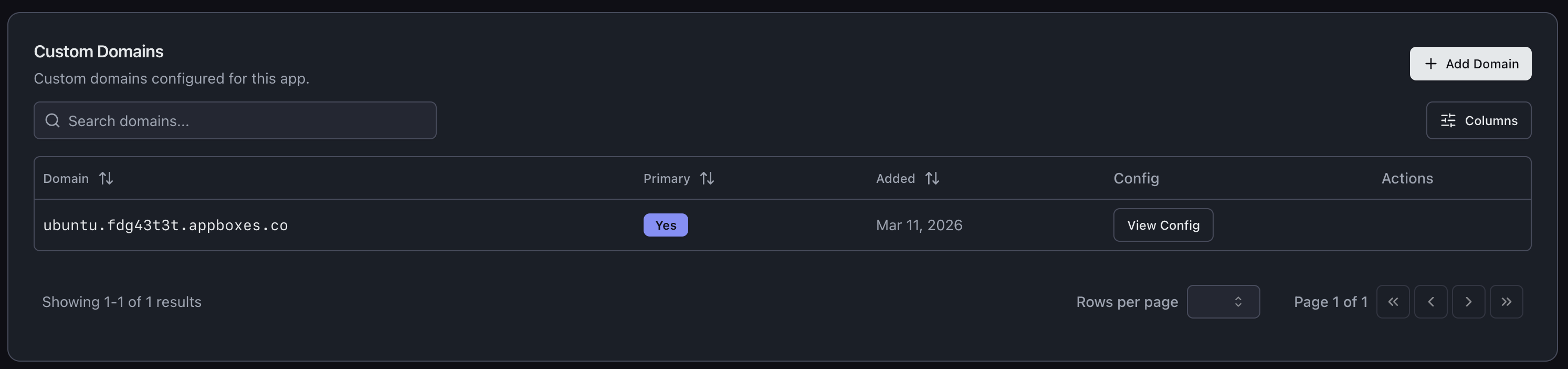
కొత్త domain జోడించడానికి, Add Domain క్లిక్ చేయండి. parent domain ఎంచుకుని subdomain enter చేస్తారు, మిగతాదాన్ని system చూసుకుంటుంది.
Appbox Subdomains
domain జోడించే వేగవంతమైన మార్గం మీ existing Appbox domain ఉపయోగించడం. మీ user.appboxes.co domain ను parent గా ఎంచుకోండి, subdomain type చేయండి, అంతే. DNS ఇప్పటికే మీ కోసం handle చేయబడింది, domain వెంటనే verified అవుతుంది.
quick project URLs, staging environments, లేదా మీ VPS లో వేర్వేరు services కు వాటి స్వంత address ఇవ్వడానికి ఇది అద్భుతంగా ఉంటుంది. backend కోసం api.user.appboxes.co, frontend కోసం app.user.appboxes.co కావాలా? రెండింటినీ ఒక నిమిషం లోపు add చేయండి.
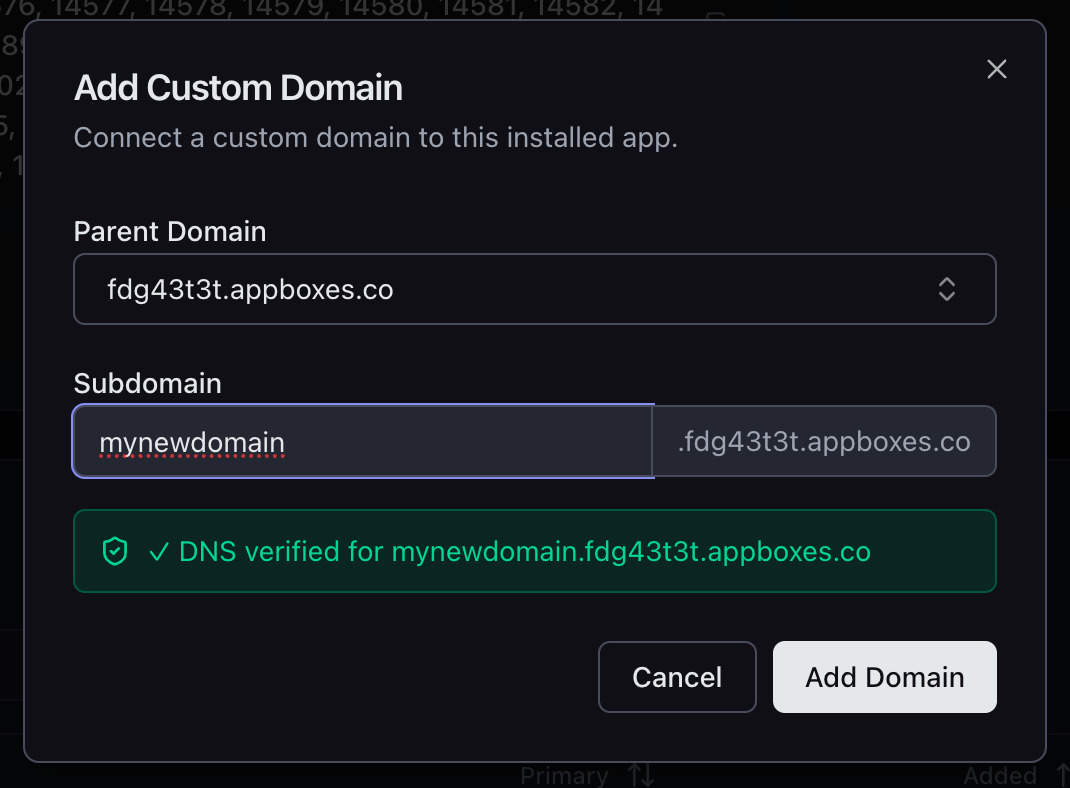
ఇవి మీ existing Appbox wildcard certificate కింద ఉంటాయి కాబట్టి, SSL automatic. waiting లేదు, certificate generation లేదు, configuration లేదు.
Custom Domains
మీ స్వంత domains ను కూడా మీ VPS వైపు point చేయవచ్చు. మీ custom base domain ఎంచుకోండి (లేదా dialog నుంచే కొత్తదాన్ని add చేయండి), subdomain enter చేయండి, UI మీకు DNS setup ద్వారా guide చేస్తుంది.
dialog సరిగ్గా ఏ A record create చేయాలో చూపిస్తుంది - hostname, IP address, అన్నీ. Cloudflare మరియు ఇతర popular DNS providers కోసం provider-specific instructions కూడా ఉంటాయి, కాబట్టి A record ఎలా add చేయాలో వెతకాల్సిన అవసరం లేదు.
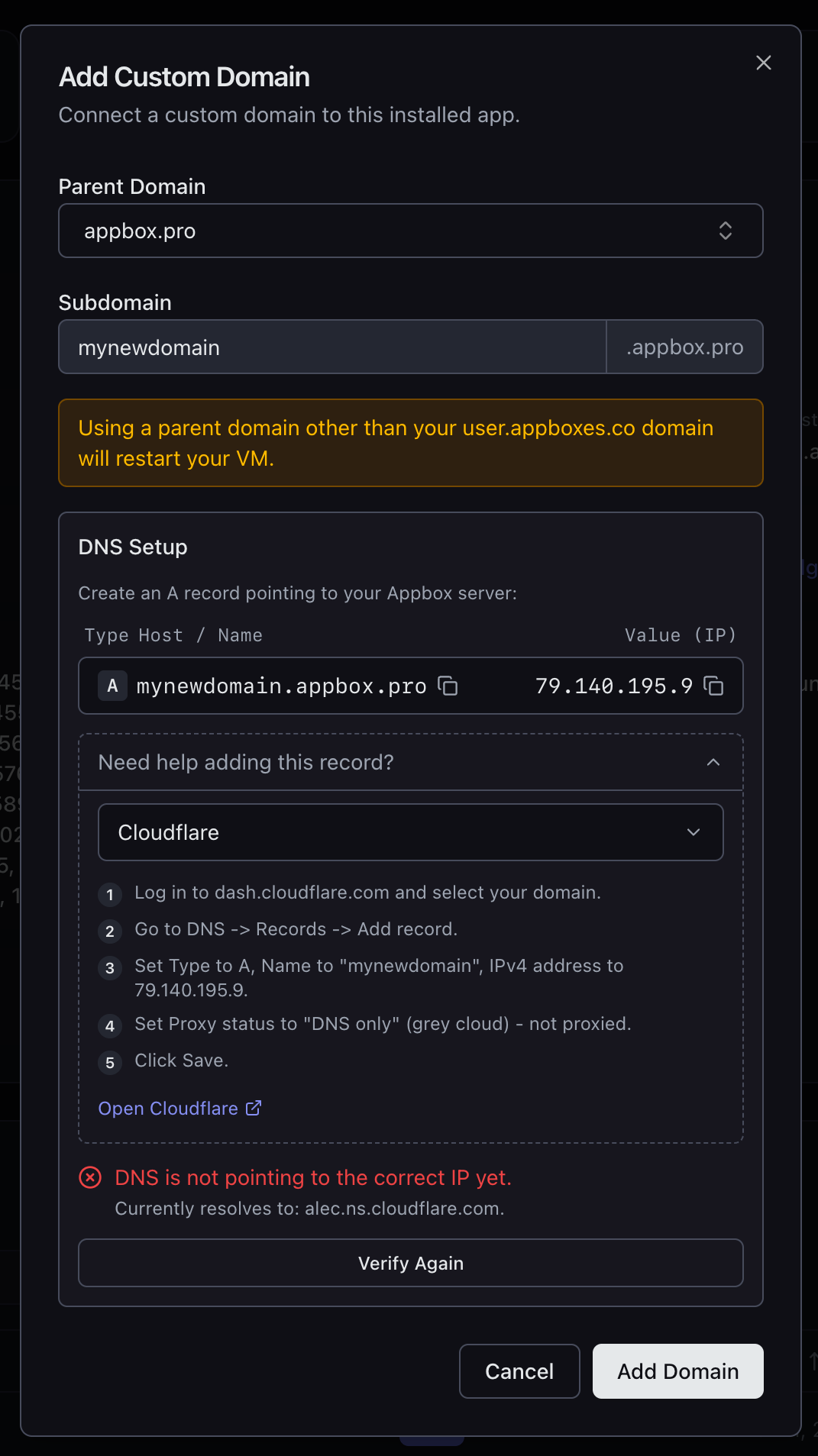
మీ DNS సరైన IP వైపు point చేస్తున్న తర్వాత, Verify Again నొక్కండి; domain add చేసే ముందు record సరైనదని system confirm చేస్తుంది.
SSL మరియు Web Server Config
మీరు add చేసే ప్రతి domain కు SSL లభిస్తుంది. Appbox subdomains కోసం, ఇది existing wildcard certificate ఉపయోగిస్తుంది. custom domains కోసం, certificate automatic గా provision అవుతుంది.
VPS users కు ఇది నిజంగా ఉపయోగకరంగా మారే భాగం ఇది: ప్రతి domain తో View Config button వస్తుంది; అది Nginx మరియు Apache రెండింటికీ ready-to-paste configuration snippets ఇస్తుంది. config లో సరైన server_name, SSL certificate paths, cipher suites, మరియు protocol settings ఉంటాయి. snippet copy చేయండి, VM లోని మీ web server config లో drop చేయండి, reload చేయండి, ఆ domain పై traffic serve చేయడం ప్రారంభించండి.
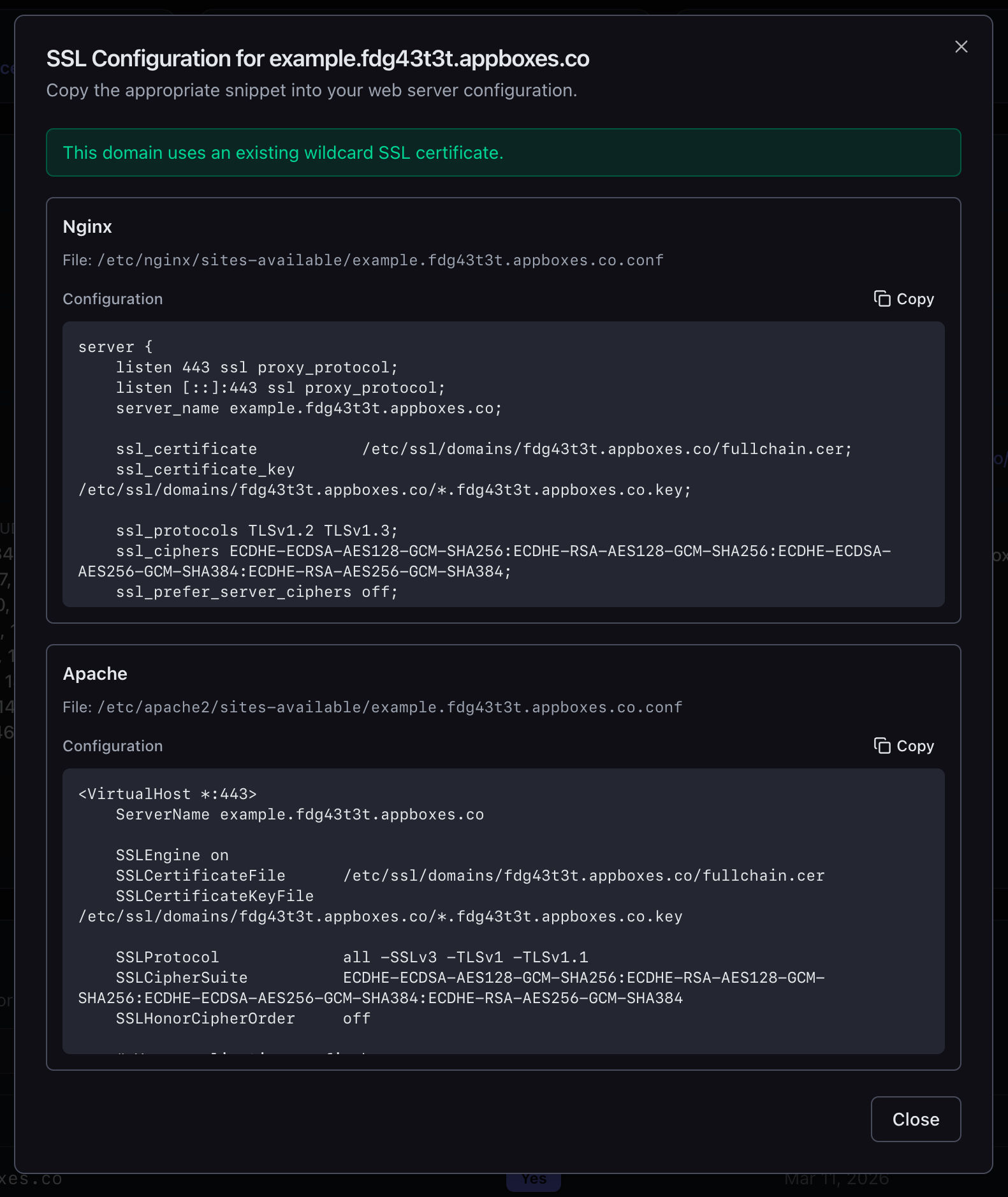
file paths పై guessing లేదు. certificate locations కోసం వెతకడం లేదు. cipher strings అర్థం చేసుకోవాల్సిన పని లేదు. అన్నీ అక్కడే ఉన్నాయి, copy చేయడానికి సిద్ధంగా.
VPS Users కు ఇది ఎందుకు ముఖ్యం
multi-domain support లేని VPS అంటే ఒకే address ఉన్న server మాత్రమే. అది త్వరగా స్పష్టమయ్యే విధంగా పరిమితం చేస్తుంది:
- separate API తో web app నడుపుతున్నారా? కనీసం రెండు domains అవసరం.
- మీ VM లో multiple sites host చేస్తున్నారా? ప్రతి ఒక్కదానికి స్వంత domain అవసరం.
- production తో పాటు staging environment కావాలా? అదొక domain.
- locally develop చేస్తూ real domain తో test చేయాలనుకుంటున్నారా? ఇంకొకటి.
రోజు 4 ఇప్పుడు Live
Multiple domain support ఇప్పుడే అన్ని VPS apps కోసం అందుబాటులో ఉంది. మీ VPS తెరవండి, Custom Domains కు scroll చేయండి, add చేయడం ప్రారంభించండి.
రేపు Day 5, మరియు మా దగ్గర surprise ఉంది. మీరు ఊహించలేరు.
Feedback ఉందా లేదా issue కనుగొన్నారా? support@appbox.co వద్ద సంప్రదించండి లేదా billing.appbox.co వద్ద ticket తెరవండి.