Custom domains
Open an app on a domain you own instead of an appboxes.co address, and add the DNS record Appbox asks for.
Every app you install gets an address on your Appbox's domain, such as myapp.mybox.appboxes.co. You can give an app an address on a domain you own instead, such as myapp.example.com. You choose this when you install the app, and Appbox shows you the DNS record to add.
You need a domain you own and access to its DNS settings at your registrar or DNS provider.
Install an app on your domain
- Open the app in the App Store and select Get.
- Choose your Appbox and fill in the app's fields as usual.
- Under Domain Type, select Custom Domain.
- Open Base Domain and pick your domain. If it isn't listed yet, select Add new domain, type the domain, for example
example.com, and select Add. - In Subdomain, type the name the app should open on, for example
myapp. A green tick and the full address show when the name is free.
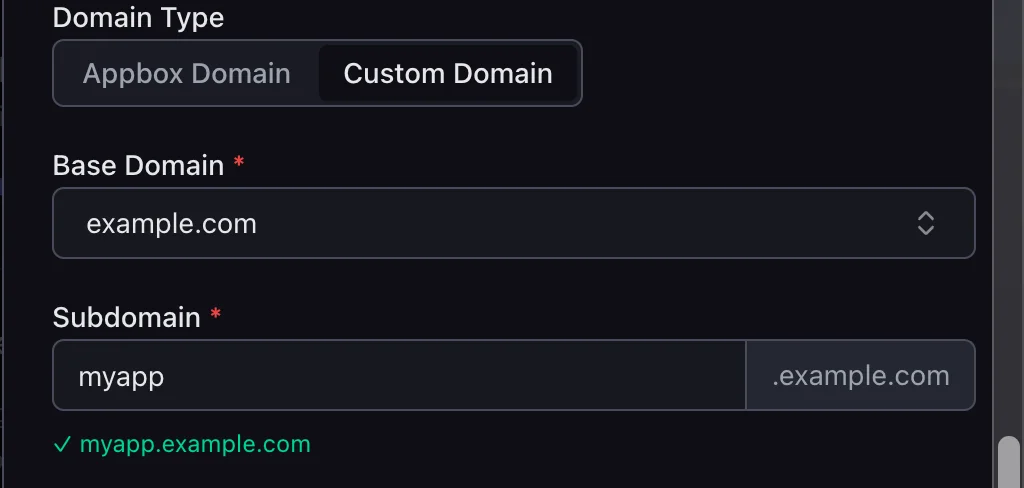
- Add the record from the DNS Setup panel at your DNS provider, as described in the next section.
- When the panel shows DNS verified, select Install. Install stays unavailable until the record checks out.
During the install, Appbox gets an HTTPS certificate for the address, so the app opens on https://myapp.example.com.
Add the DNS record
The DNS Setup panel shows one A record:
| Field | What to enter |
|---|---|
| Type | A |
| Host / Name | The subdomain you chose, such as myapp. Some providers want the full name, myapp.example.com. |
| Value (IP) | The IP address shown in the panel, which is your Appbox server's address |
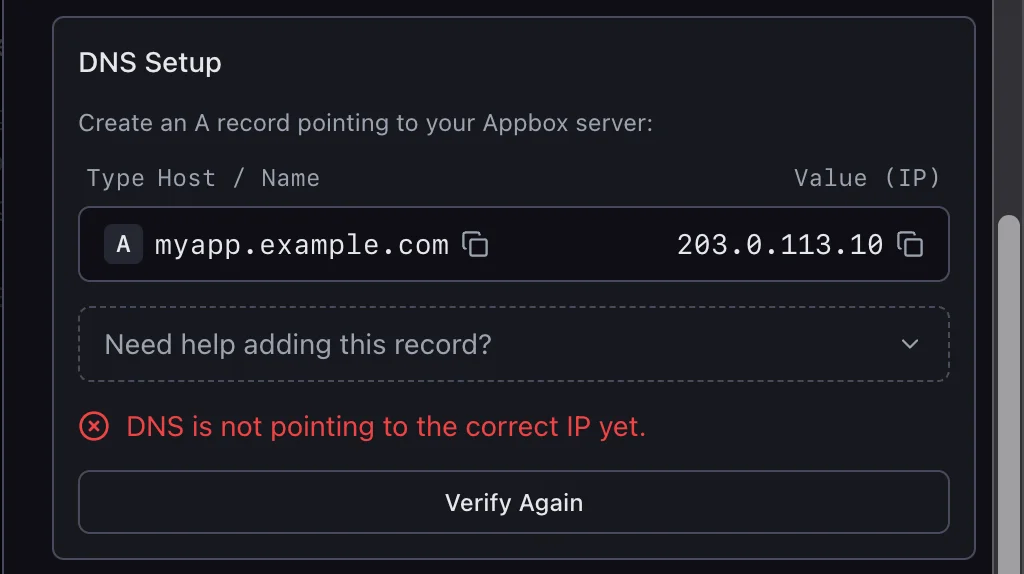
Select Need help adding this record? for steps at Cloudflare, Namecheap, GoDaddy, Squarespace, AWS Route 53 and DigitalOcean.
Appbox checks the record as soon as the panel appears. Until your provider publishes it, the panel says DNS is not pointing to the correct IP yet. Save the record at your provider, wait a few minutes and select Verify Again.
If your domain uses Cloudflare, set the record's proxy status to DNS only (grey cloud). A proxied record points to Cloudflare instead of your Appbox, so the check fails.
Manage your domains
Appboxes > Custom Domains lists the domains you've added as Base, and the app addresses on them as Managed, each with the app it opens.
- Uninstalling an app removes its address.
- To remove a domain you no longer use, select the Delete Domain icon on its Base row. The icon is unavailable while an app still has an address on that domain.
More than one domain on a VPS
A VPS can have several addresses. Open the VPS's page and use the Custom Domains card:
- Select Add Domain.
- Choose a Parent Domain: your own domain, or your Appbox's
mybox.appboxes.co. - Type a Subdomain.
- Add the
Arecord that the dialog shows, as above. - Select Add Domain.
After you add a domain, Appbox shows snippets for configuring it in Nginx or Apache inside the VPS. You can open them again with View Config. Appbox gets the HTTPS certificate for a domain added this way in the background, so HTTPS can take a few minutes to start working.
Adding or removing a domain that isn't under your Appbox's own domain restarts the VPS. The domain the VPS was installed with can't be removed.
Troubleshooting
| What you see | What to check |
|---|---|
| DNS is not pointing to the correct IP yet. | The record is missing or has a different IP, or your provider hasn't published it yet. Compare it with the DNS Setup panel, wait a few minutes and select Verify Again. |
| The check keeps failing on a Cloudflare domain | Set the record to DNS only instead of proxied. |
| This domain is reserved and cannot be used. | Domains under appboxes.co, appbox.co, abx.bz, cylo.io and cylo.net belong to Appbox. Choose Appbox Domain to use your Appbox's own address. |
| This subdomain is already in use, please try another. | Another app already uses that address. Choose another subdomain, or uninstall the app that uses it. |