Launch Week Day 5 - Windows 11 Pro VPS and App Freeze
Day 5 of Launch Week. Windows 11 Pro is now available as a VPS on Appbox. Plus, a new freeze feature lets you pause apps and reclaim their slots without losing data.
Launch Week Day 5: Windows 11 Pro VPS and App Freeze
Day 5. The final day. We said yesterday that you wouldn't see this coming, and we meant it.
Windows 11 Pro is now available as a VPS on Appbox.
Windows on Appbox
When we launched VPSes on Day 3 with five Linux distributions, the natural question was "what about Windows?" Getting Windows to run properly as a managed VPS on Appbox was a significant technical challenge. Linux VMs use virtiofs for near-native file sharing between the host and the guest. Windows doesn't support virtiofs. So we built a Samba-based integration that creates authenticated SMB shares for each VM, giving Windows the same seamless access to your Appbox data that Linux VPSes get - just through a protocol Windows understands natively.
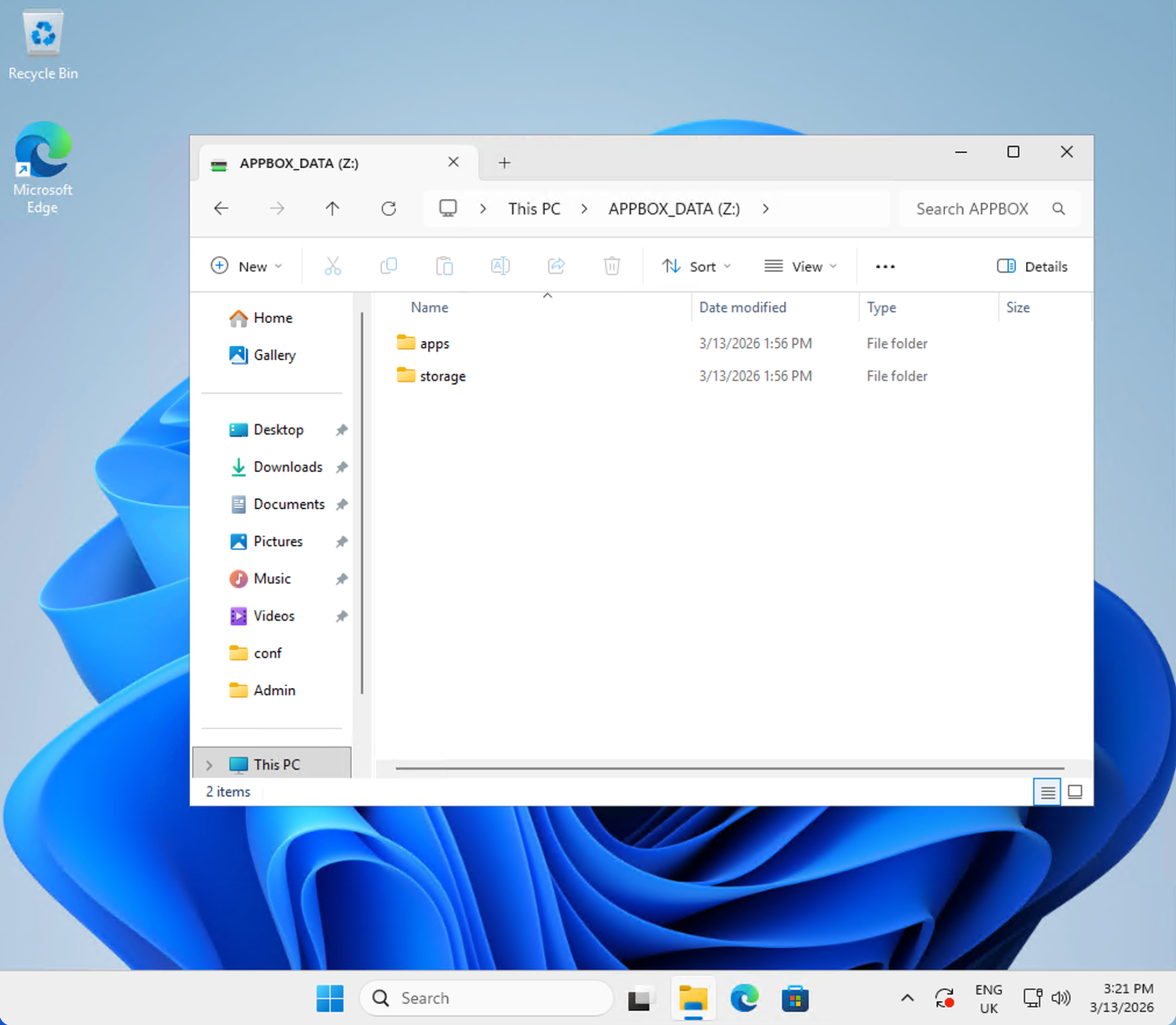
The result is a full Windows 11 Pro virtual machine running on KVM with your Appbox data mounted as the Z: drive (APPBOX_DATA). Open File Explorer, navigate to Z:\, and you'll see your apps/ and storage/ folders right there.
What This Opens Up
Having a Windows VPS on Appbox opens up an entirely new category of use cases:
- Windows-only software - run applications that simply don't have Linux versions
- .NET development - build and test .NET applications in a real Windows environment
- Office and productivity - run Microsoft Office, Adobe tools, or any desktop software
- Game servers - host Windows-only game servers
- Remote desktop - access a full Windows desktop from any browser via the built-in web console, or connect with Microsoft Remote Desktop for a native RDP experience
- Testing and CI - test your software on Windows without maintaining your own hardware
This is a full Windows 11 Pro installation with administrator access. If it runs on Windows, it runs here.
Plan Availability
Windows 11 Pro has quite high resource requirements and is heavy on disk I/O. To ensure a good experience for everyone, the Windows VPS is currently available on dedicated Appbox plans only (NG-18000 and above). We may expand availability to other plans in the future as we continue to optimise.
Licensing
The Windows 11 Pro VPS does not include a product key. Windows will run unactivated with a persistent watermark on the desktop, limited personalisation settings, and periodic activation reminders - but is otherwise fully functional. To remove these restrictions, activate with a valid Windows 11 Pro key. We recommend purchasing one from WinCDKey (~6 EUR).
Works with App Boost
Windows 11 Pro VPS fully supports App Boost from Day 2. If you need more performance for heavier workloads, slide the boost level up to allocate more RAM and CPU to your VM.
App Freeze
There's a second feature shipping today that applies to all apps, not just Windows.
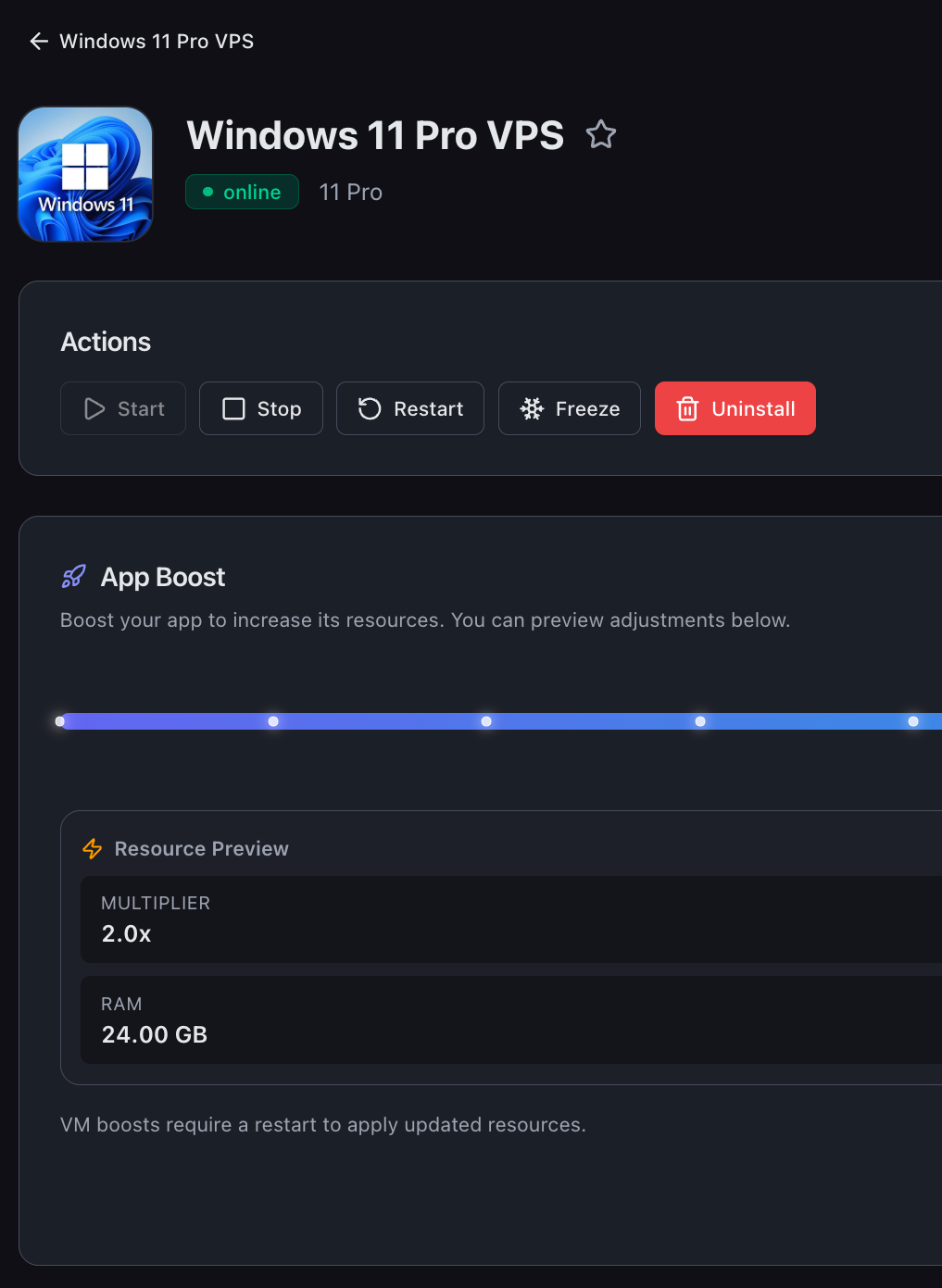
App Freeze lets you pause any installed app and reclaim its app slots without losing any data. The app stops, its data stays exactly where it is, and the slots it was using become available for other apps.
This solves a problem that's come up constantly: you want to try a new app, but you've used all your slots. Before today, you'd have to uninstall something - and lose its data - just to free up enough slots to experiment. Now you can freeze an app, use those slots to install and test something new, and then unfreeze the original app when you're done. Everything picks up right where you left off.
The Freeze button sits right in the Actions section of any app's detail page, next to Start, Stop, and Restart. Freezing stops the app, marks it as frozen, and returns its slots (including any boost slots) to your available pool. Unfreezing restores the app and re-consumes the slots.
A few things worth noting:
- You can't freeze an app while it's installing, updating, or being deleted
- You can't unfreeze if your Appbox doesn't have enough free slots to cover the cost
- Frozen apps keep all their data and configuration intact
That's a Wrap
Five days. Five launches.
- Day 1 - the new dashboard
- Day 2 - App Boost
- Day 3 - Linux VPSes
- Day 4 - multiple domains for VPS apps
- Day 5 - Windows 11 Pro VPS and App Freeze
Everything shipped this week is live right now. Log in and try it.
Launch Week is over, but we're not stopping. There's plenty more coming in the months ahead.
Got feedback or found an issue? Reach out at support@appbox.co or open a ticket at billing.appbox.co.