FTP and FTPS without running your own VM
Pure-FTPd hosting on Appbox. Publish a dedicated FTP hostname and port, create the primary user at install, then add more accounts and paths from the dashboard.
What you get with Pure-FTPd hosting
A focused FTP daemon with encryption options and Appbox-managed networking.
TLS-ready FTPS
Offer encrypted sessions with modern TLS. Plain FTP still exists for legacy clients, but FTPS is what you should publish to users.
Primary plus extra users
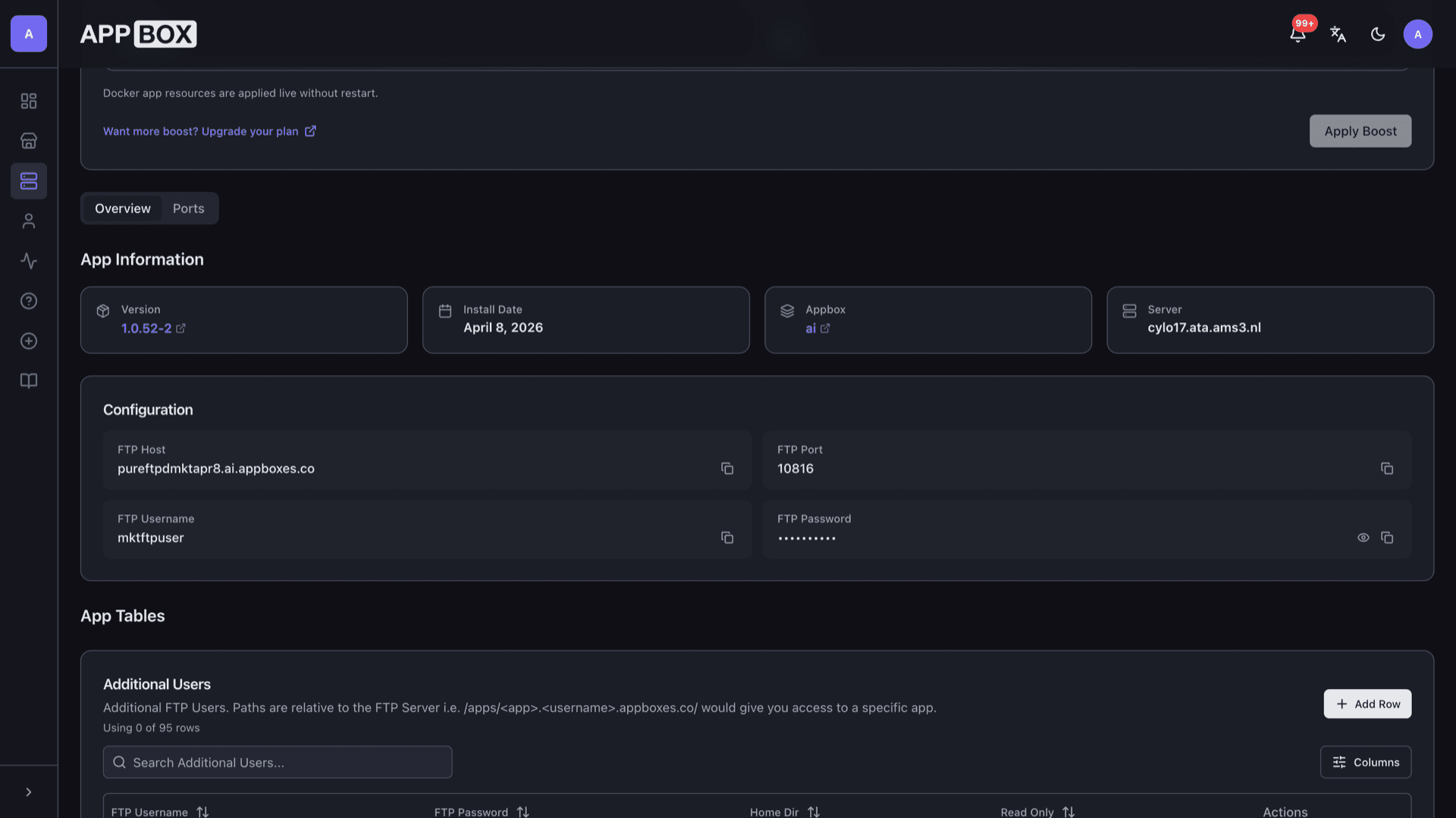
Define the first username and password at install, then maintain additional FTP users, home directories, and read-only flags from App Tables on the Overview tab.
Chroot-friendly design
Pure-FTPd is built around privilege separation and chrooted access patterns so virtual users stay inside their file areas.
Host and port on the panel
After install, Configuration lists FTP host, external port, and masked password with copy actions so you can paste details into FileZilla, WinSCP, or any FTPS-aware client.
Port mappings visible
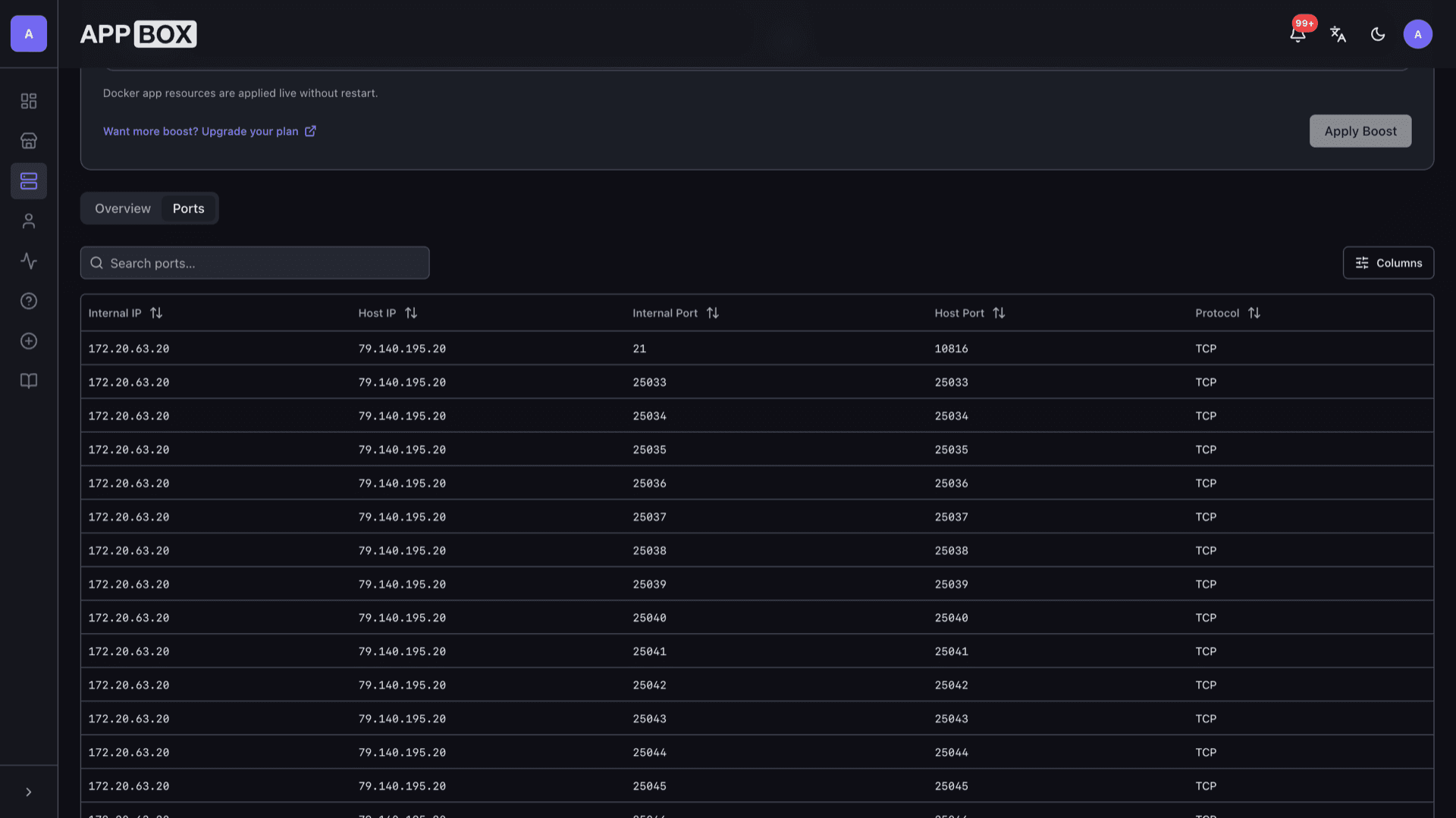
The Ports tab shows how internal FTP port 21 maps to your public port plus the passive port range Appbox exposes for directory listings and transfers.
Lightweight footprint
The daemon stays small on CPU and RAM, which matters when you only need FTP-style workflows instead of a full file suite.
Pure-FTPd on your Appbox
Install in seconds
Pick your Appbox, fill in a few fields, and Pure-FTPd (FTP Server) is live.
Install Pure-FTPd (FTP Server)
Requires 1 App Slot
This demo shows what the installer looks like after you have an Appbox.
Multiplier
1.4x
Slot Cost
5 / 21
RAM
8.40 GB
CPUs
∞
✓ ftp.steve.appboxes.co
Ready to install? You will need an active Appbox first.
This is a preview of the install form. Choose a plan to create your Appbox and deploy for real.
Operations and client reality
FTP still shows up in cameras, printers, and old integrations. Here is how this app fits.
Path hints for home dirs
Additional user paths are relative to the FTP server root. Point homedirs at /apps/... when you need scoped access to another app on the same Appbox.
Use FTPS in the client
Configure explicit FTP over TLS, verify you are using the host and port from Configuration, and enable passive mode when your client asks.
Client compatibility
Some GUI clients handle TLS and passive data channels better than others. If directory listings fail, double-check passive settings and the published port range on the Ports tab.
Not a substitute for SFTP
Appbox also offers SSH and SFTP access to your storage outside this app. Pick FTPS here when the workflow truly requires FTP semantics.
FTPS on Pure-FTPd vs SFTP over SSH
| Feature | Pure-FTPd (FTPS) | SFTP (SSH) |
|---|---|---|
| Protocol | FTP with TLS (FTPS) | SSH file transfer |
| Typical clients | Dedicated FTP/FTPS clients | scp, sftp, many IDEs |
| Extra FTP users | Managed in App Tables | Uses SSH accounts model |
| Firewall friendliness | Needs passive ports plus control port | Usually one SSH port |
| Legacy hardware | Often required for older devices | Rare on embedded FTP-only gear |
| Self-hostable on Appbox |
Prefer encryption
Frequently asked questions
Start Pure-FTPd hosting on Appbox
Deploy the FTP daemon in one flow, copy connection details from Configuration, and point your clients at FTPS with passive mode enabled.
Available versions
| Version | App Slots | RAM | CPU | Released | Changes |
|---|---|---|---|---|---|
| 1.0.52-2 | 1 | 6 GB | Shared | Dec 4, 2025 |
Need more resources? Use Per-App Boost to allocate extra App Slots and increase RAM and CPU by 10% per slot. See the FAQ below for details.
Pure-FTPd (FTP Server)
by Frank Denis