
Private VPN on your Appbox
OpenVPN hosting on Appbox. Publish UDP and TCP listeners, hand clients a ready-made .ovpn profile, and manage extra users without rebuilding the container.
What you get with OpenVPN hosting
A long-standing TLS VPN stack packaged as a managed app with clear connection details in the control panel.
Encrypted tunnels
OpenVPN negotiates TLS-protected tunnels over UDP or TCP so road-warrior devices reach your Appbox network without exposing plain credentials on the wire.
Profile download
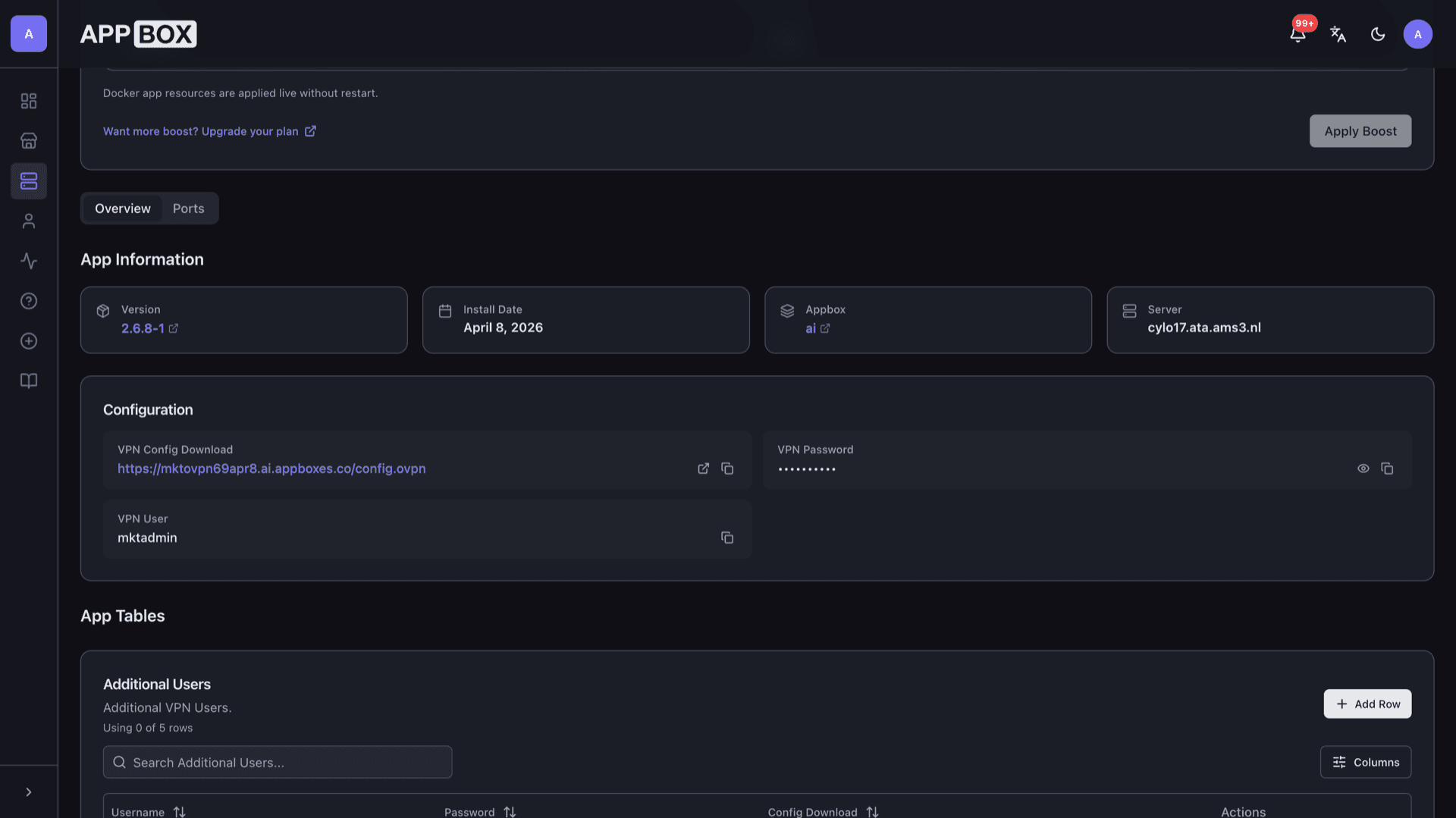
The Configuration section links to an HTTPS .ovpn file on your instance domain. Import it into the official OpenVPN Connect or compatible clients on desktop and mobile.
User credentials
Primary VPN username and password appear on the Overview tab with copy helpers, matching the account you define at install time.
Published ports
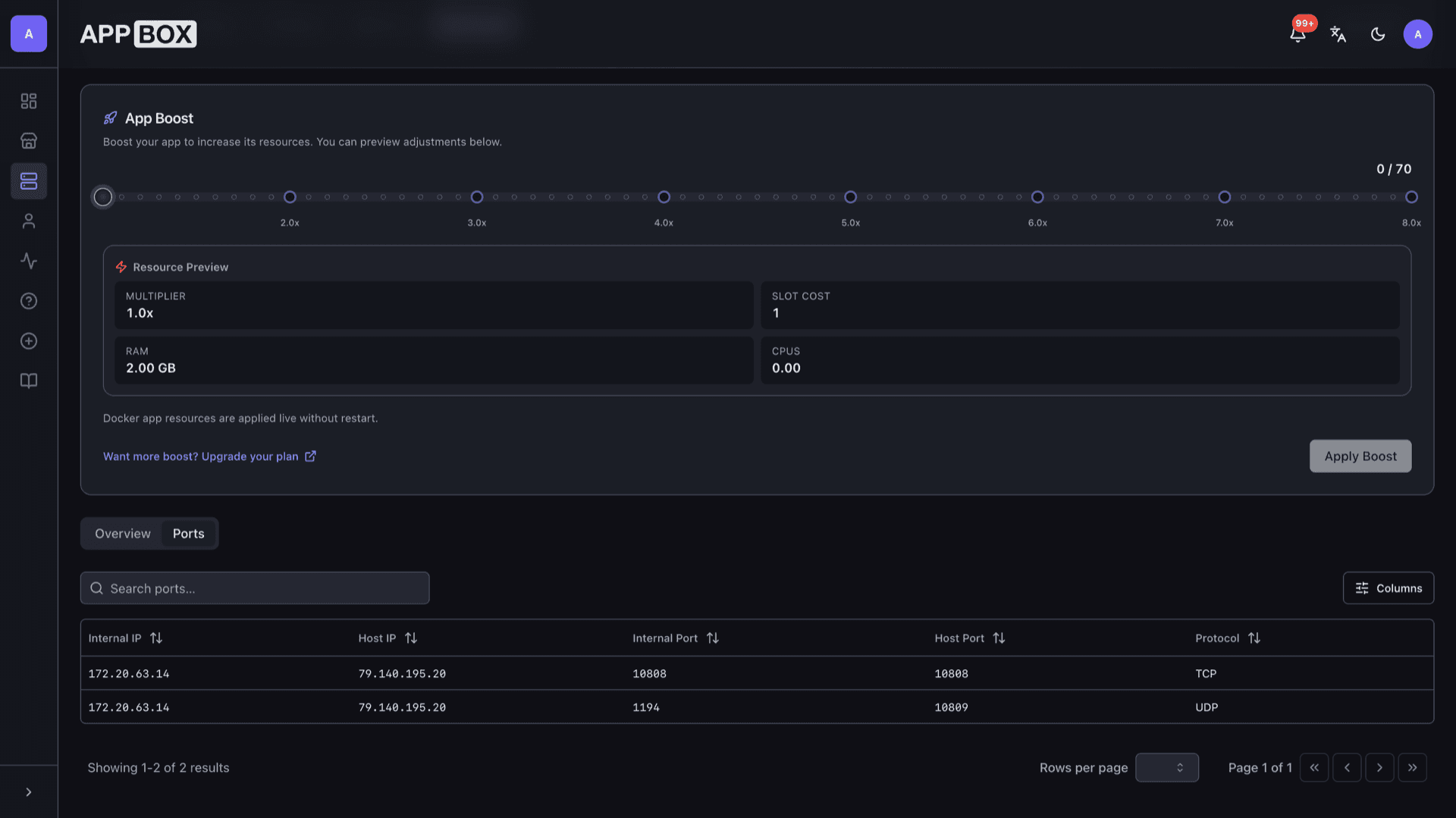
The Ports tab lists internal and host mappings for TCP and UDP so you know exactly which host ports clients should target.
Additional users
Provision extra VPN accounts from the App Tables section when you need separate logins without sharing one profile.
Managed runtime
Runs as a platform-managed container with RAM and CPU from your plan, while you focus on routes and client rollout instead of hypervisor maintenance.
OpenVPN on Appbox
Install in seconds
Pick your Appbox, fill in a few fields, and OpenVPN is live.
Install OpenVPN
Requires 1 App Slot
This demo shows what the installer looks like after you have an Appbox.
Multiplier
1.4x
Slot Cost
5 / 21
RAM
2.80 GB
CPUs
∞
✓ vpn.steve.appboxes.co
Ready to install? You will need an active Appbox first.
This is a preview of the install form. Choose a plan to create your Appbox and deploy for real.
Operations that stay in your hands
Fine-grained VPN work still happens in client profiles and routing, while Appbox handles the container lifecycle.
Cipher policy
Tune algorithms and lifetimes in line with upstream OpenVPN guidance. Newer images on Appbox ship with modern defaults such as AES-256-GCM where the image maintainer enables them.
DNS and routes
Push split-tunnel or full-tunnel behavior through the .ovpn profile or server-side directives so clients send only the traffic you intend across the VPN.
Cross-platform clients
Pair the downloaded profile with vendor clients on Windows, macOS, Linux, iOS, and Android when you need parity across a mixed fleet.
Boost when load grows
If sessions or throughput climb, raise Per-App Boost from the installed app page to add RAM and CPU without migrating images manually.
OpenVPN vs WireGuard on Appbox
| Feature | OpenVPN | Wireguard VPN |
|---|---|---|
| Protocol | TLS-based OpenVPN | WireGuard UDP |
| Client ecosystem | Mature third-party clients | Growing native and kernel clients |
| CPU overhead | Higher per-tunnel cost | Lower per-tunnel cost |
| Firewall traversal | TCP fallback option | UDP-first; TCP modes differ by client |
| Configuration style | .ovpn bundles with inline or file refs | Short key files and simple endpoints |
| Self-hostable on Appbox |
Import before you connect
Frequently asked questions
Deploy OpenVPN hosting
Stand up TLS VPN access on Appbox in one install flow, with HTTPS profile delivery and published ports you can hand to your team.
Available versions
| Version | App Slots | RAM | CPU | Released | Changes |
|---|---|---|---|---|---|
| 2.6.16 | 1 | 2 GB | Shared | Apr 13, 2026 |
Need more resources? Use Per-App Boost to allocate extra App Slots and increase RAM and CPU by 10% per slot. See the FAQ below for details.