Launch Week Day 4 - VPS Apps साठी Multiple Domains
Launch Week चा Day 4. VPS apps आता multiple domains support करतात - तुम्हाला लागतील तितके custom domains आणि Appbox subdomains जोडा, सर्व automatic SSL सह.
Launch Week Day 4: VPS Apps साठी Multiple Domains
Day 4. काल आम्ही तुम्हाला full virtual machines दिल्या. आज आम्ही त्यांना proper domain support देत आहोत.
Day 3 ला VPSes launch केले तेव्हा प्रत्येक VM ला एक domain मिळत होता. अनेक use cases साठी ते ठीक आहे, पण तुमच्या VPS मध्ये web server चालवत असाल - आणि तुमच्यापैकी बरेच जण चालवतील - तर एक domain पुरेसा नाही. तुम्हाला त्याच machine कडे point करणारे multiple domains हवे असतात, प्रत्येकासाठी स्वतःचे SSL certificate आणि web server configuration.
आज, VPS apps multiple domains support करतात. तुम्हाला हवे तितके *.user.appboxes.co subdomains जोडा, तुमचे स्वतःचे custom domains आणा, किंवा दोन्ही mix करा. प्रत्येकाला SSL आणि ready-to-use web server configuration मिळते.
हे कसे काम करते
कोणतेही running VPS app उघडा आणि detail page वर Custom Domains card दिसेल. तुमचे सर्व domains येथे असतात - त्या VPS ला attached प्रत्येक domain, कोणता primary आहे, आणि तो कधी add केला हे दाखवणारी searchable, sortable table.
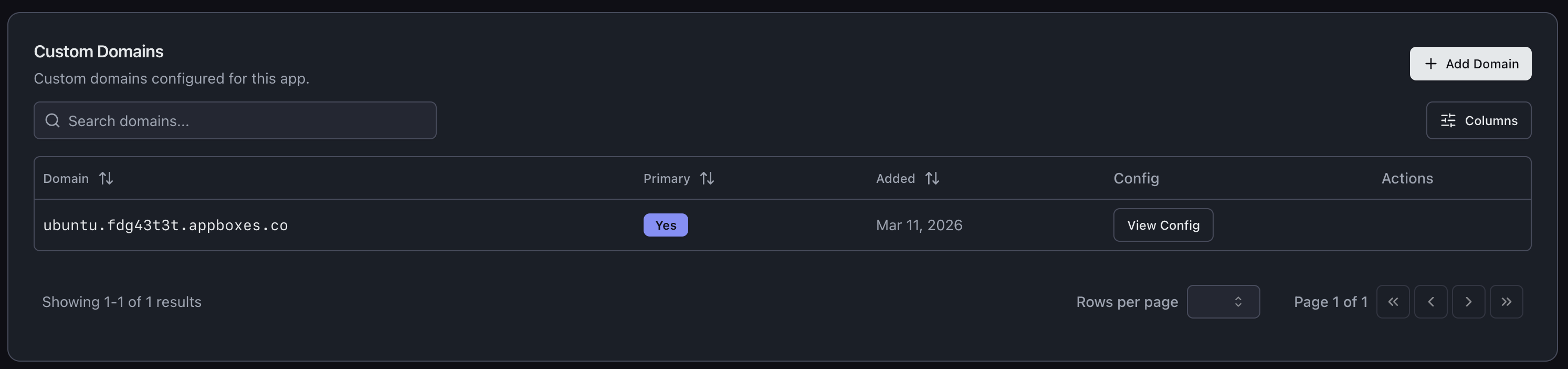
नवीन domain add करण्यासाठी Add Domain क्लिक करा. Parent domain निवडा, subdomain enter करा, आणि system बाकी सांभाळते.
Appbox Subdomains
Domain add करण्याचा सर्वात जलद मार्ग म्हणजे तुमचा existing Appbox domain वापरणे. Parent म्हणून तुमचा user.appboxes.co domain निवडा, subdomain type करा, आणि झाले. DNS तुमच्यासाठी आधीच handled आहे, आणि domain instantly verified होतो.
Quick project URLs, staging environments, किंवा तुमच्या VPS वरील वेगवेगळ्या services ना स्वतःचा address देण्यासाठी हे उत्तम आहे. Backend साठी api.user.appboxes.co आणि frontend साठी app.user.appboxes.co हवे? दोन्ही एका minute पेक्षा कमी वेळात add करा.
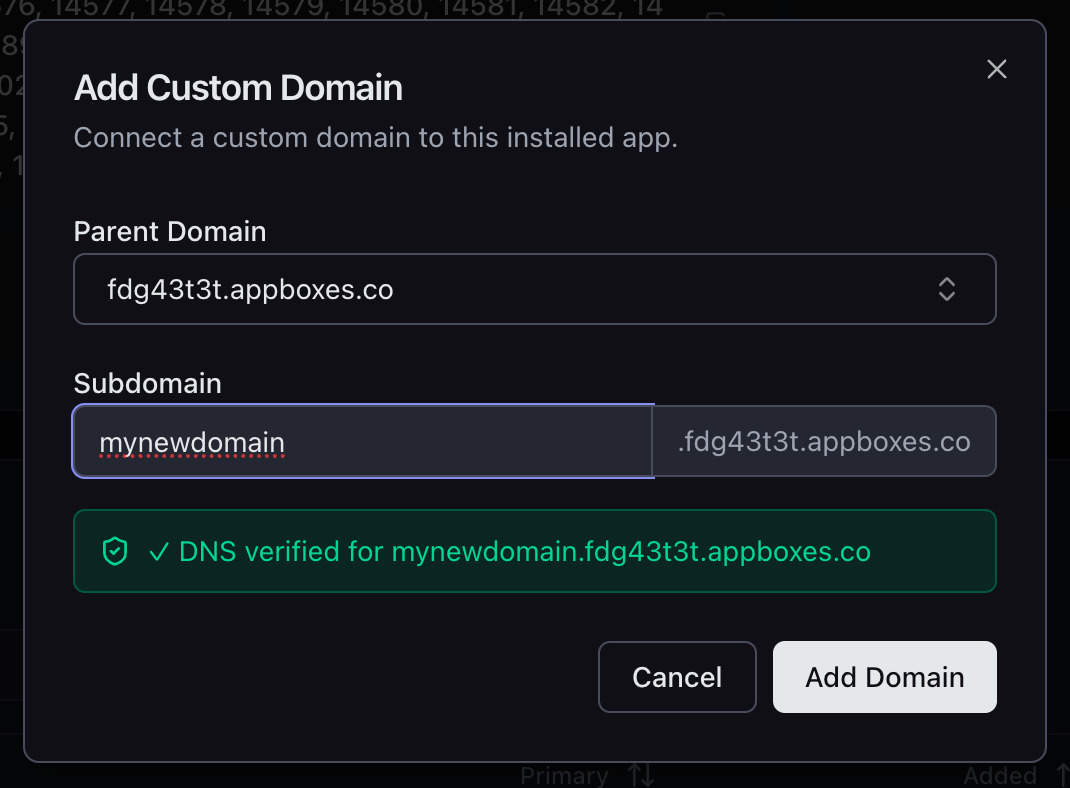
हे तुमच्या existing Appbox wildcard certificate खाली असल्यामुळे SSL automatic आहे. Waiting नाही, certificate generation नाही, configuration नाही.
Custom Domains
तुम्ही तुमचे स्वतःचे domains देखील VPS कडे point करू शकता. तुमचा custom base domain निवडा (किंवा dialog मधूनच नवीन जोडा), subdomain enter करा, आणि UI तुम्हाला DNS setup मधून guide करते.
Dialog create करायचा exact A record दाखवतो - hostname, IP address, सर्व काही. Cloudflare आणि इतर popular DNS providers साठी provider-specific instructions देखील आहेत, त्यामुळे A record कसा add करायचा हे शोधत बसावे लागत नाही.
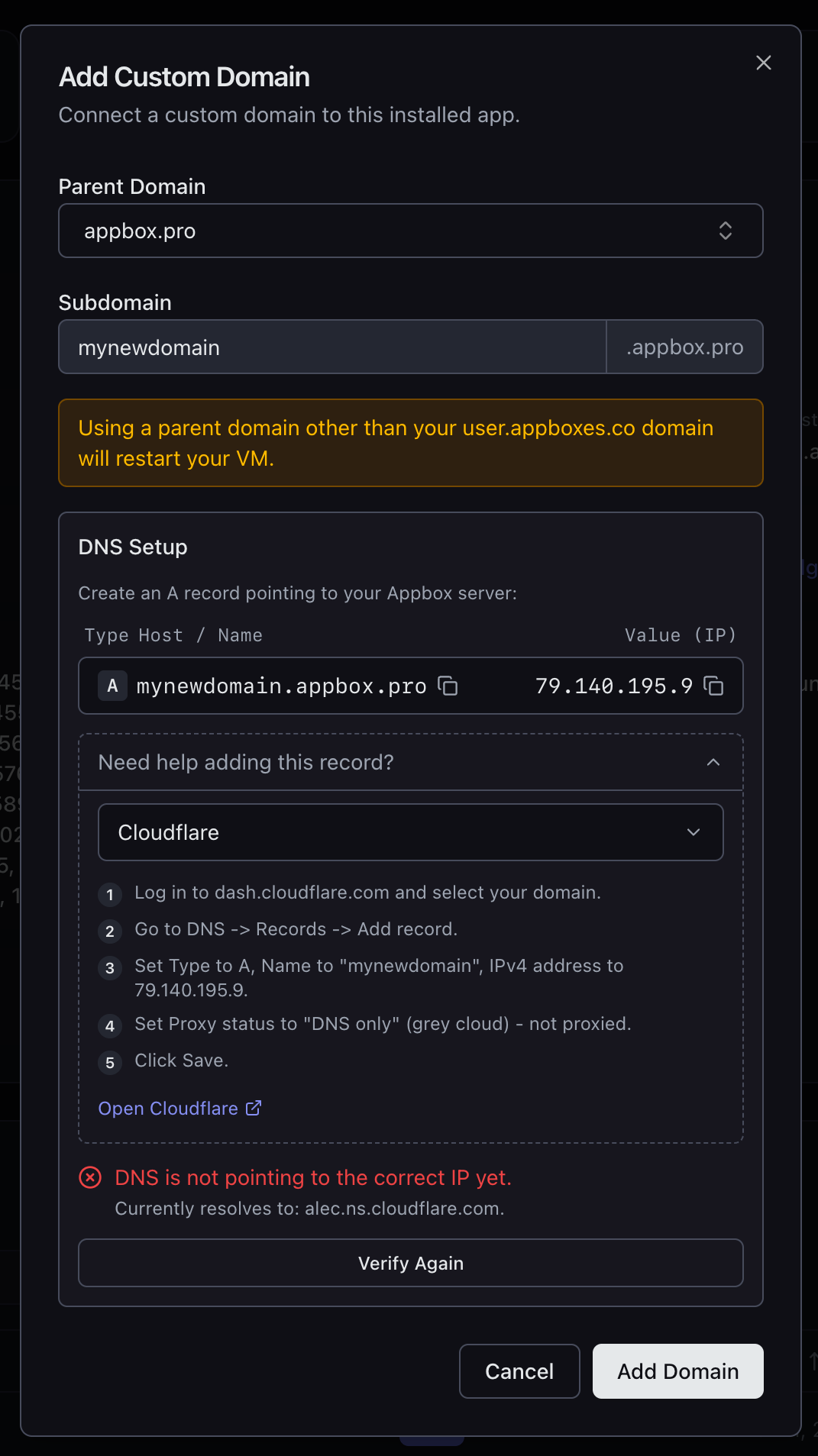
तुमचा DNS योग्य IP कडे point करू लागल्यावर, Verify Again दाबा आणि domain add करण्यापूर्वी system record योग्य आहे याची confirm करते.
SSL आणि Web Server Config
तुम्ही add केलेल्या प्रत्येक domain ला SSL मिळते. Appbox subdomains साठी existing wildcard certificate वापरले जाते. Custom domains साठी certificate automatically provision केले जाते.
VPS users साठी हे खरोखर उपयुक्त बनवणारा भाग असा: प्रत्येक domain सोबत View Config button येतो, जो Nginx आणि Apache दोन्हीसाठी ready-to-paste configuration snippets देतो. Config मध्ये योग्य server_name, SSL certificate paths, cipher suites, आणि protocol settings समाविष्ट आहेत. Snippet copy करा, VM मधील तुमच्या web server config मध्ये drop करा, reload करा, आणि त्या domain वर traffic serve करा.
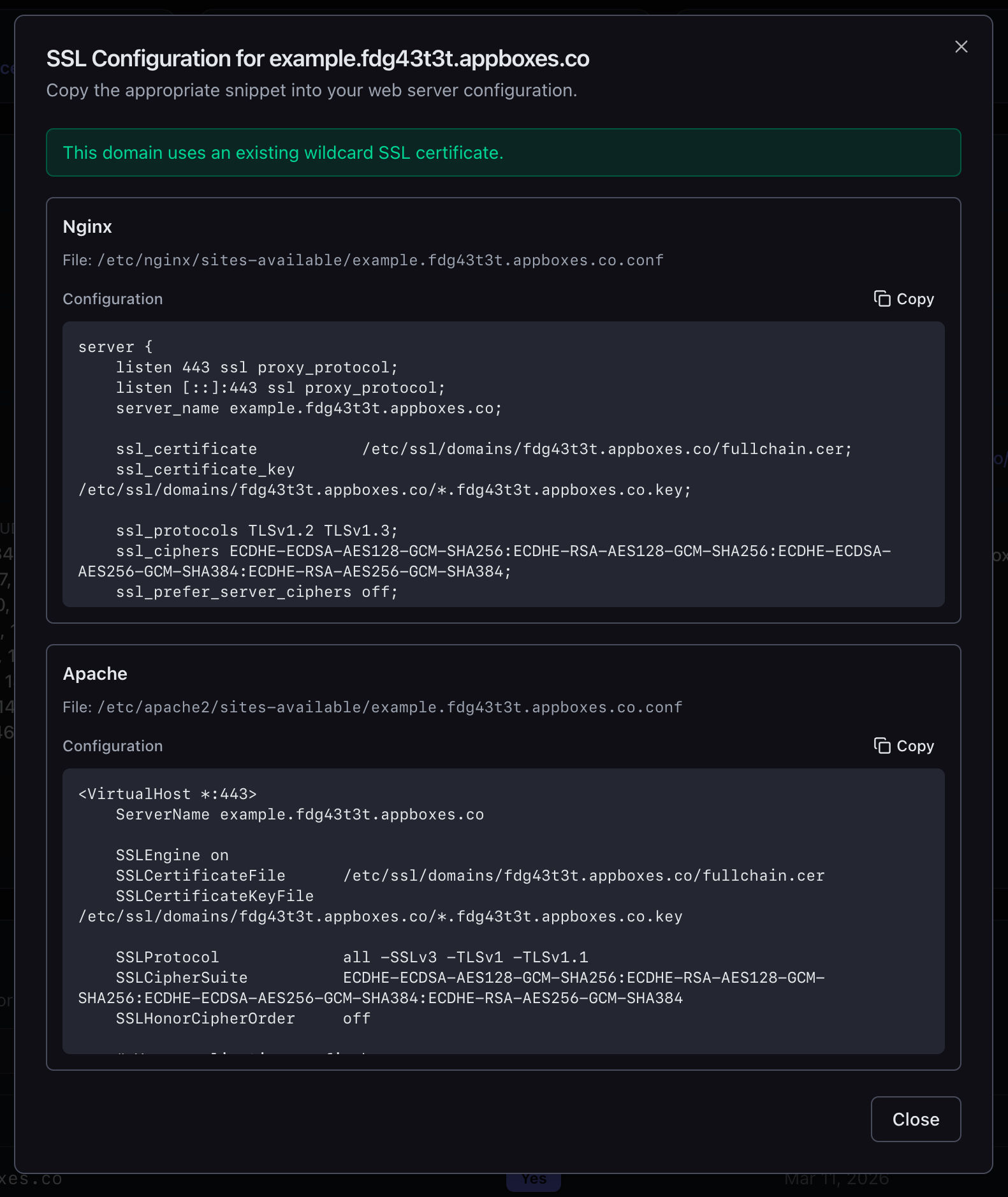
File paths बद्दल guessing नाही. Certificate locations शोधणे नाही. Cipher strings काढणे नाही. सगळे तिथे आहे, copy करण्यासाठी ready.
VPS Users साठी हे महत्त्वाचे का आहे
Multi-domain support नसलेला VPS म्हणजे एका address असलेला server. हे किती limiting आहे ते पटकन स्पष्ट होते:
- Separate API सह web app चालवत आहात? किमान दोन domains लागतात.
- तुमच्या VM मध्ये multiple sites host करत आहात? प्रत्येकाला स्वतःचा domain लागतो.
- Production सोबत staging environment हवे आहे? आणखी एक domain.
- Locally develop करताना real domain ने test करायचे आहे? अजून एक.
Day 4 आता Live आहे
Multiple domain support आत्ता सर्व VPS apps साठी उपलब्ध आहे. तुमचा VPS उघडा, Custom Domains पर्यंत scroll करा, आणि add करायला सुरुवात करा.
उद्या Day 5 आहे, आणि आमच्याकडे surprise आहे. तुम्हाला ते येताना दिसणार नाही.
Feedback आहे किंवा issue सापडला? support@appbox.co वर संपर्क करा किंवा billing.appbox.co वर ticket उघडा.