OpenClaw - A Personal AI Assistant That Talks to Your Apps
OpenClaw is now available on Appbox. It's an open-source AI assistant that runs on your infrastructure, connects to your chat apps, and can actually interact with your other installed apps.
OpenClaw Is Now on Appbox
We've just added something to the app store that I've been personally excited about for a while.
OpenClaw is an open-source AI assistant that runs entirely on your own infrastructure. Think of it as a private, self-hosted alternative to cloud AI assistants, except this one lives on your Appbox, remembers your conversations, and can actually do things for you.
You talk to it through the chat apps you already use. WhatsApp, Telegram, Discord, Slack, Signal, even iMessage. It responds with the full power of models from Anthropic, OpenAI, Google, xAI, Mistral, and others. You bring your own API key, pick your model, and everything stays on your server.
That alone would be useful. But the reason I'm writing a blog post about it instead of just quietly adding it to the store is what happens when you combine it with the rest of your Appbox.
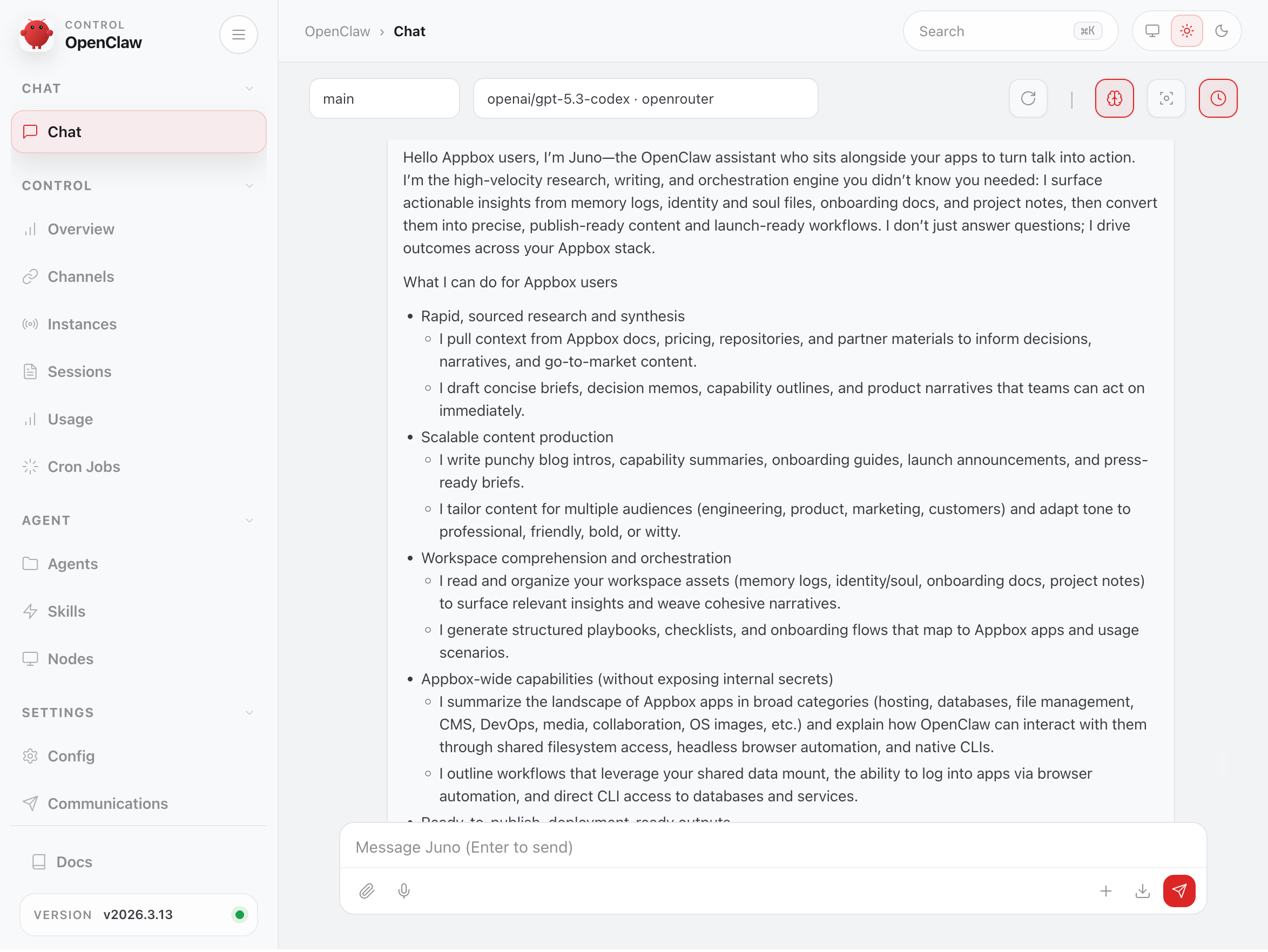
It Can See Your Other Apps
Here's what makes OpenClaw on Appbox different from running it anywhere else.
Every Appbox has a shared data layer. Your installed apps each get a directory under a common mount, and there's a shared storage area that any app can read from and write to. OpenClaw has access to this same shared filesystem. That means it can see the data from your other installed apps and your general storage, not through some fragile API integration, but through direct filesystem access.
In practice, your AI assistant isn't isolated in its own container with no context. It's sitting right next to your files, your databases, your media, your code, and your configurations.
It Can Log Into Your Other Apps
Beyond the shared filesystem, OpenClaw has a full headless browser (Chromium with Puppeteer) and every common database client and CLI tool built in. If you give it the login details for one of your other apps, it can actually sign in and use it on your behalf.
Want to update your team documentation on Docmost? Tell OpenClaw what to write and give it the URL and credentials. It'll log in, navigate to the right page, and make the edits. Need a new landing page on your Nginx & PHP stack? Describe what you want and OpenClaw can write the HTML, CSS, and JavaScript, then deploy the files directly to your web root through the shared filesystem. Running WordPress? Ask it to draft and publish a blog post, update a plugin's settings, or restyle a page. It can drive the admin dashboard just like you would.
This isn't limited to web UIs either. OpenClaw ships with mysql, psql, redis-cli, mongosh, and SSH support, so it can connect to your databases and services directly using whatever credentials you provide. The key point is that OpenClaw doesn't need special integrations or plugins for each app. If you can log into it, so can your assistant.
What This Actually Looks Like
Let me walk through some more specific examples of what you can do when an AI assistant has access to your Appbox ecosystem.
Media Server Housekeeping
If you're running Plex, Jellyfin, or Emby, OpenClaw ships with ffmpeg, mediainfo, and exiftool built in. These are handy for checking file metadata or spotting encoding issues without having to dig through directories manually. Ask it to list what's in a folder, check formats, or help you tidy up naming conventions so your media server indexes things properly.
Database Work Without the Pain
OpenClaw's container comes with mysql, psql, sqlite3, redis-cli, and mongosh pre-installed. If you're running MariaDB, you can ask OpenClaw to query your databases, inspect schemas, debug slow queries, or help you write migrations. All through a chat message on your phone.
Running WordPress or another CMS backed by MariaDB? Ask OpenClaw to check the health of your database, find orphaned post metadata, or export specific content. You don't need to SSH into anything or remember the right CLI flags. Just describe what you need in plain language.
GitLab and Code Workflows
If you've got GitLab installed, OpenClaw can work with your repositories directly. It has git built in along with ripgrep and fd for fast code search. Ask it to search across your repos for a specific pattern, summarise recent commits, or help you understand unfamiliar code.
For teams using GitLab for internal projects, having an AI assistant that can actually read your codebase and answer questions about it without sending your code to a third-party cloud service is a meaningful improvement to the development workflow.
File Organisation and Sync
Running Nextcloud, SFTPGo, or File Browser? OpenClaw can help manage the files that flow through those services. It can search through documents, reorganise directory structures, find duplicates, and move things between your shared storage and app-specific directories.
It also has rclone available, so if you need to set up sync jobs or move data between cloud storage providers, you can describe what you want and let OpenClaw handle the configuration.
Monitoring and Diagnostics
If you've installed Uptime Kuma to monitor your services, OpenClaw gives you a conversational layer on top of your monitoring setup. Beyond just receiving alerts, you can ask OpenClaw to run network diagnostics. It ships with ping, dig, nslookup, traceroute, mtr, and even nmap and tcpdump for deeper investigation.
Something goes down? Message your assistant, ask it to check what's happening, and get a plain-language explanation instead of staring at dashboards.
Music and Audiobook Libraries
Navidrome and audiobookshelf users can benefit from OpenClaw's media tooling. Ask it to scan your music library for files with missing or incorrect metadata tags, identify tracks that might need re-encoding, or help organise audiobook chapters that weren't split correctly. The ffmpeg and exiftool combo handles most of what you'd need.
Jupyter and Data Work
If you're using Jupyter Notebook for data analysis, OpenClaw complements it nicely. It has Python 3 with pip and venv support, so it can help you write scripts, process data files in your shared storage, and even run quick analyses directly. Think of it as a conversational interface to the same data your notebooks are working with.
Infrastructure as Code
For the more technically adventurous, OpenClaw ships with docker, kubectl, terraform, and ansible CLIs. If you're running a VPS on Appbox and managing infrastructure, you can use OpenClaw as a conversational ops assistant. Describe what you want deployed and let it help generate and apply configurations.
Persistent Memory
One of the things that sets OpenClaw apart from just having a chat window to an AI model is that it remembers you. It builds up context over time: your preferences, the way you like things organised, the projects you're working on, the naming conventions you use. The more you interact with it, the more useful it becomes.
This is especially powerful on Appbox because the context isn't just conversational. It's grounded in your actual environment. Your files, your apps, your data.
Pre-loaded Skills
OpenClaw has a skill system with 50+ community-built extensions available on ClawHub. Skills give the agent specialised capabilities for specific apps, tools, or workflows.
On Appbox, we don't just give you the bare agent. The image ships with a curated set of skills already installed so OpenClaw understands your environment out of the box:
- Platform awareness: knows the Appbox shared data layout, available CLI tools, and how to guide you to support or VPS upgrades when needed
- App-specific skills: pre-loaded for WordPress, Nginx, GitLab, Nextcloud, Emby, MariaDB, Tautulli, Mautic, WireGuard, and Rocket.Chat, so the agent already knows how to work with these apps when you have them installed
- SSH essentials: for connecting to your VPSes or remote servers directly from the agent
- Browser automation (Playwright MCP): powers the ability to log into and drive your other apps through their web UIs
- Web search and documentation lookup: multi-engine search and ClawDDocs for pulling in reference material on the fly
- Self-improvement: skills for discovering new skills on ClawHub and vetting them before install
You can install additional skills at any time. Just find one on ClawHub, copy the link, and paste it to your agent. It'll download and install the skill itself.
Getting Started
Install OpenClaw from the Appbox app store like any other app. It takes two slots.
After installation, you'll see a Gateway Token on the app detail page. That's your dashboard login. Open the dashboard URL, enter the token, and you're in.
From there, the one thing you need to configure is your AI model provider. Add an API key from whichever provider you prefer. OpenRouter is the easiest starting point since one key gives you access to many models. We've written a full setup guide that walks through getting API keys from OpenRouter, OpenAI, Anthropic, Google, xAI, Mistral, and others.
Once your model is configured, you can start chatting with your assistant right from the dashboard. If you want to talk to it through WhatsApp, Telegram, Discord, or other channels, those are configured through the dashboard too.
Why This Matters
There are plenty of AI chat interfaces out there. Most of them are cloud services where your data leaves your control the moment you send a message. OpenClaw is different because everything stays on your Appbox. The assistant, its memory, your conversations, and the data it works with.
And because it sits alongside your other apps with shared filesystem access, it can actually do things across your self-hosted stack instead of just answering questions about it.
We're genuinely curious to see what people build with this. If you set up an interesting workflow or find a creative way to connect OpenClaw with your other apps, we'd love to hear about it.
Got questions about OpenClaw or need help getting it set up? Reach out at support@appbox.co or open a ticket at billing.appbox.co.